


|
|
Creating an object (CreateObject)
In this tutorial, we create a Graphics Display Kit object from the ground up.
Here is what the definition of a Graphics Display Kit object looks like, at the base-type level. Most of the base types defining a Graphics Display Kit object are optional. In the diagram, the object is connected into Uviewer3D, a macro that defines a full-featured renderer, including a view and a rendering window.
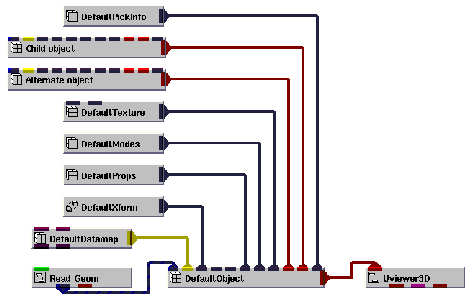
The data object we'll build consists of DefaultObject (the data object's "root" object), DefaultModes, and DefaultProps.
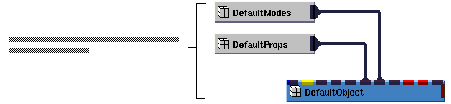
Instance into the SingleWindowApp workspace the following objects: DefaultModes, DefaultProps, and DefaultObject. Connect them as shown in the diagram below.
A Graphics Display Kit application requires a view for the Graphics Display Kit object and a window in which to render the view. For this tutorial, we create both with Uviewer3D. Uviewer3D is a full-featured 3D viewer, complete with a top-level object, a window, a view, and related editors.
Instance Uviewer3D and connect it to DefaultObject, as shown in the diagram below.
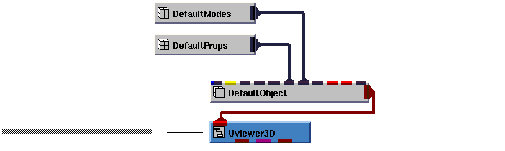
When we instance Uviewer3D, a window with a black window inside it appears. This is where the data is rendered.
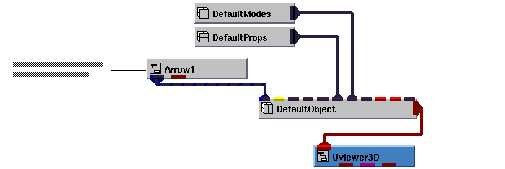
Finally, we need to supply the Graphics Display Kit with an object to render. We can do this with Arrow1. It makes the data available both as a field (first output port) and as a Graphics Display Kit object (second output port), ready for rendering. We use the second output port.
Instance Arrow1 and connect it to DefaultObject, as shown in the diagram below.
The application renders an arrow in the view's window.
This completes the tutorial. The completed tutorial is available in Libraries.Examples.Graphics_Display.CreateObject.
|
|