


|
|
Place annotation interactively (ImageAnno)
The drawing modules can be used to place annotation interactively. This example uses the ClickSketch and text_glyph modules to do this. A text string is rendered at each coordinate in the field created by the drawing module.
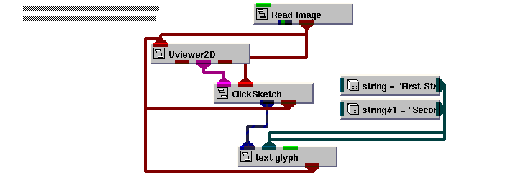
Instance ImageAnno into the empty NE workspace.
This example is found in Libraries.Examples.Graphics_Display. Upon being instanced, the he example renders the image avs.x in the viewer's window.
We are now ready to annotate the image.
Select Editors->Modules to make the modules user interface panel visible. Select ClickSketch from the Modules option menu. This causes the user interface for the ClickSketch module to appear.
In this example, the ClickSketch module is set up to draw a polyline. Other primitives that are available are point, line, box, and polygon.
Begin drawing a polyline, using the add point operation.
The mouse operations that control the drawing in the ClickSketch module are:
|
|
|
|
Hold down the Control key and press the right button. This completes the primitive that is in progress. This operation applies only to the polyline and polygon primitives. |
Since you have chosen the polyline primitive, each add point operation adds another point to the polyline. The polyline is terminated and automatically closed with the close operation.
Since the immediate toggle is set in this example, the ClickSketch module converts the polyline to a field as soon as the close region operation is performed.
This touches on only a small portion of the capabilities in the ClickSketch module.
Observe the text strings that have appeared.
As soon as a field is created by the ClickSketch module, text strings appear at each point in the field. The text_glyph module does this by taking a field and an array of strings as input.
Delete the ImageAnno application.
|
|